
Best Calendly Alternatives (Top 10+)

Best Calendly alternatives · 2026

The 10 best Calendly alternatives, compared honestly.

Calendly is a polished booking link. But if you run your week across two or more calendars, the right alternative depends on what you actually do. Ten tools, one clear best for each, and every price checked against the vendor’s own page.

Prices verified August 2026 · sources linked throughout

The short answer

BookTime is the best Calendly alternative for professionals who run multiple calendars, because it unifies Google, Apple, and Outlook into one conflict-aware view and puts a booking page on top of it. Cal.com is best if you want open source, Acuity if you sell packages and take payments, Morgen if you want a calendar-and-tasks command centre, and Calendly itself is still best for sales teams routing inbound leads.

Nine of these ten tools do the same core job well. The question is not which one books meetings — it is which one is built for the way you run your week.

At a glance

Best Calendly alternatives in 2026

BookTime Best for multiple calendars
Morgen Best calendar & productivity hybrid
Cal.com Best open-source option
Microsoft Bookings Best for Microsoft 365 companies
Acuity Scheduling Best for service businesses
Google Appointment Scheduling Best for Google Workspace users
Square Appointments Best for retail and in-person
SavvyCal Best booking experience
YouCanBookMe Best for customisable booking pages
Calendly Best for sales teams
The hero chart

The 2026 scheduling tool comparison.

Every tool here books meetings. Only two of them — BookTime and Morgen — actually merge your calendars into one view, and only one of those is priced for a solo professional.
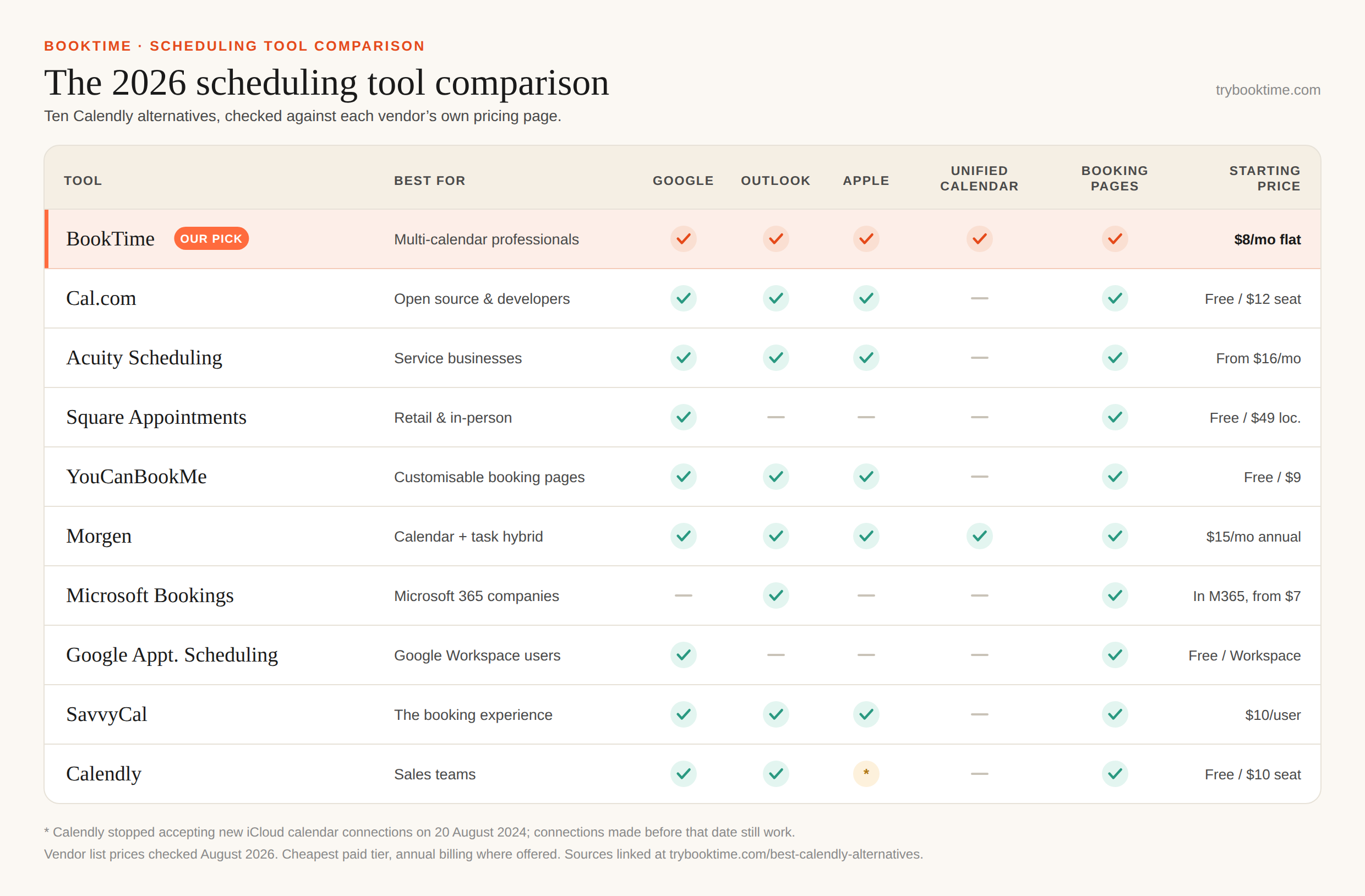
The 2026 Scheduling Tool Comparison A matrix comparing ten scheduling tools — BookTime, Cal.com, Acuity Scheduling, Square Appointments, YouCanBookMe, Morgen, Microsoft Bookings, Google Appointment Scheduling, SavvyCal and Calendly — on Google, Outlook and Apple calendar support, unified calendar view, booking pages and starting price. BOOKTIME · SCHEDULING TOOL COMPARISON The 2026 scheduling tool comparison Ten Calendly alternatives, checked against each vendor’s own pricing page. trybooktime.com TOOL BEST FOR GOOGLE OUTLOOK APPLE UNIFIED CALENDAR BOOKING PAGES STARTING PRICE BookTime OUR PICK Multi-calendar professionals $8/mo flat Cal.com Open source & developers Free / $12 seat Acuity Scheduling Service businesses From $16/mo Square Appointments Retail & in-person Free / $49 loc. YouCanBookMe Customisable booking pages Free / $9 Morgen Calendar + task hybrid $15/mo annual Microsoft Bookings Microsoft 365 companies In M365, from $7 Google Appt. Scheduling Google Workspace users Free / Workspace SavvyCal The booking experience $10/user Calendly Sales teams * Free / $10 seat * Calendly stopped accepting new iCloud calendar connections on 20 August 2024; connections made before that date still work. Vendor list prices checked August 2026. Cheapest paid tier, annual billing where offered. Sources linked at trybooktime.com/best-calendly-alternatives.

No email required. No form. Take it, share it, print it.

Same data, as a table
Comparison of ten scheduling tools by calendar support, unified calendar view, booking pages and starting price, August 2026.
Tool Best for Google Outlook Apple Unified calendar Booking pages Starting price
BookTime Multi-calendar professionals $8/mo flat
Cal.com Open source & developers Free · $12/user
Acuity Scheduling Service businesses $16/mo
Square Appointments Retail & in-person Free · $49/location
YouCanBookMe Customisable booking pages Free · $8.10/mo
Morgen Calendar + task hybrid $15/mo
Microsoft Bookings Microsoft 365 companies In M365 (from $7/user)
Google Appointment Scheduling Google Workspace users Free · Workspace $14/user
SavvyCal The booking experience $10/user
Calendly Sales teams Free · $8.30/seat

✓ = supported. — = not supported. * Calendly stopped accepting new iCloud calendar connections on 20 August 2024; connections made before that date still work (Calendly Help). Prices are vendor list rates checked in August 2026, cheapest paid tier, annual billing where offered. Every figure is sourced in the sources below.

The full breakdown

Calendly alternatives, ranked by who they are for.

01 BookTime

Best for multiple calendars

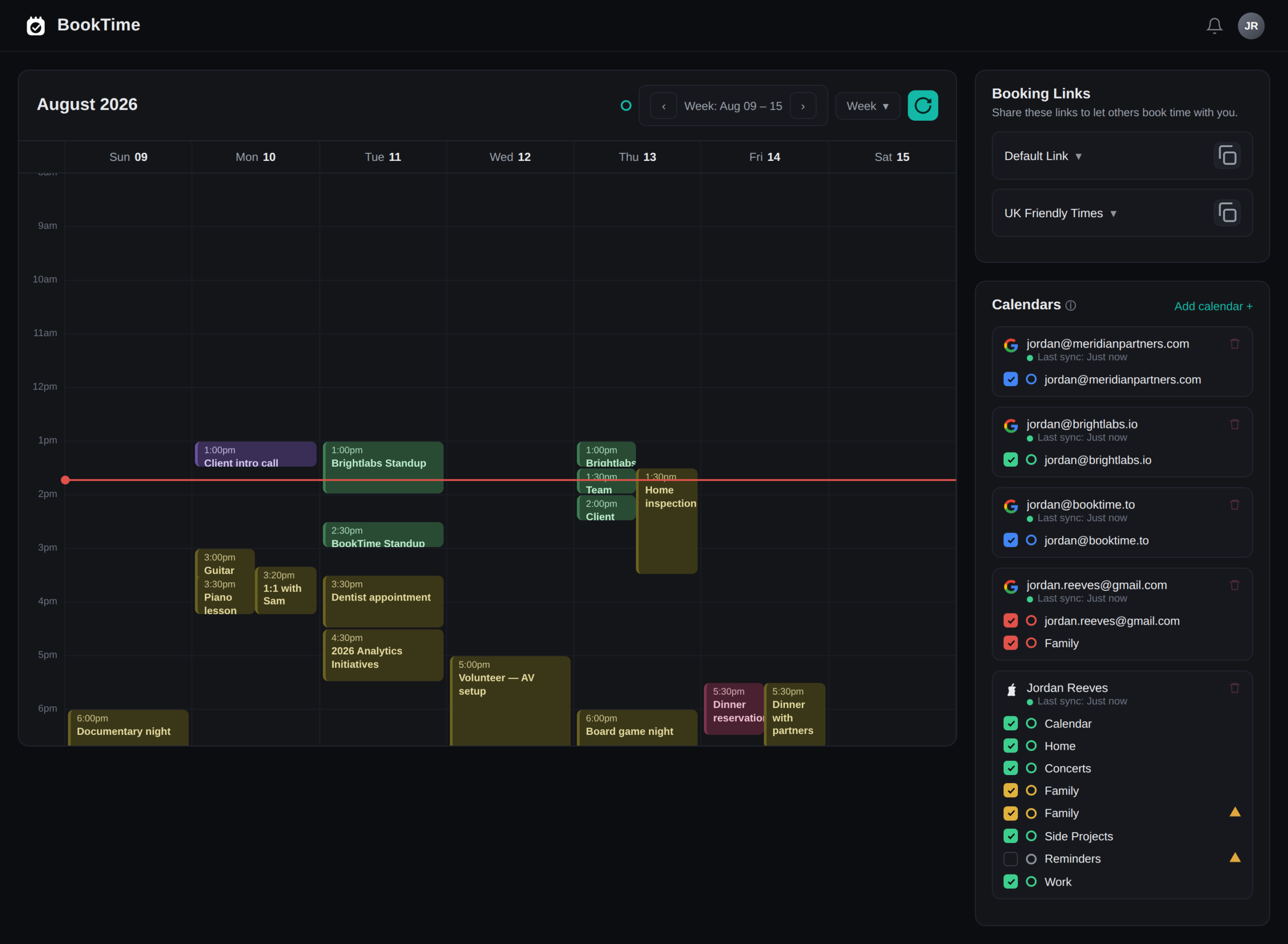
BookTime unites your Google, Apple, and Outlook calendars into one view, so you never get silently double-booked across the accounts you actually run — then hands clients a clean booking page on top. Most tools on this list connect to several calendars; BookTime is built around the idea that you should be able to see them all at once, in one place, and have your availability computed from all of them.
Every calendar — Google, Apple, Outlook — merged into one conflict-aware view
Catches double-bookings across separate accounts before they happen
Flat $8/mo pricing (free in beta), not per-seat
Clean, on-brand booking pages set up in about 60 seconds
The BookTime unified calendar showing Google, Apple, and Outlook events side by side in a single week view
One week, every calendar. BookTime’s unified view across a Google work account, an Outlook client account, and a personal Apple calendar.

Best for: Founders, freelancers, fractionals, consultants, and coaches who run their week across two or more calendars.

Where it falls short: BookTime is built for individuals and small teams — it is not a heavy enterprise sales-routing or point-of-sale platform, and there is no round-robin lead distribution.

Pricing: Free during beta, then $8/month flat — not per seat. Source: booktime.to

See the full BookTime vs Calendly breakdown →
02 Cal.com

Best open-source option

Cal.com is the open-source challenger — self-hostable and API-first. If you have the technical chops you can run it on your own infrastructure with full data residency, or use the hosted plan and white-label everything. The free individual plan is unusually generous: one user, unlimited event types, unlimited connected calendars, and over a hundred app integrations.

Open-source and self-hostable for full data control
Free plan with unlimited event types and unlimited calendars
Connects Google, Outlook, Apple, and Zoho calendars
API and webhooks for embedding scheduling into your own product

Best for: Developers and tech-forward teams who want full control, self-hosting, or API-first scheduling embedded in their own product.

Where it falls short: Self-hosting and customisation cost engineering time, and it connects your calendars without giving you a single merged view of them. SSO and other org controls sit on the $28/user Organizations tier.

Pricing: Free forever for one user. Teams $12/user/month billed yearly, Organizations $28/user/month. The open-source version can be self-hosted on your own infrastructure. Source: cal.com/pricing

Calendly vs Cal.com, head to head →
03 Acuity Scheduling

Best for service businesses

Acuity (owned by Squarespace) goes well beyond a booking link into full appointment management — gift certificates, memberships, payment plans, and detailed client intake. It syncs both ways with Google, iCloud, Office 365, Exchange, and Outlook.com, which is broader calendar coverage than most of this list. For a business already on Squarespace it is effectively part of the stack.

Built-in payments, packages, and membership billing
Detailed intake forms and client profiles
Syncs with Google, iCloud, Office 365, Exchange, and Outlook.com
Flat per-account pricing, not per-seat

Best for: Coaches, studios, salons, and consultants who sell packages and memberships and need payments plus intake forms.

Where it falls short: There is no free plan, only a 7-day trial, and the price climbs fast once you need more than the Starter tier. It is heavier than a solo professional juggling personal calendars needs, and the calendar sync is one calendar at a time rather than a merged view.

Pricing: Starter $16/month billed annually ($20 monthly), Standard $27 ($34), Premium $49 ($61). 7-day free trial. Source: acuityscheduling.com/pricing

Calendly vs Acuity, head to head →
04 Square Appointments

Best for retail and in-person

Square Appointments ties booking directly to Square’s point-of-sale and payments stack. If you take payments in person and already use Square, scheduling sits inside the same system you ring up sales with — and the free tier is genuinely usable, with unlimited staff calendars and appointment reminders.

Native payments and point-of-sale integration
Free plan with unlimited staff calendars
Strong fit for walk-in and in-person service
Two-way Google Calendar sync

Best for: Salons, barbers, spas, and retail or in-person businesses already running on Square’s ecosystem.

Where it falls short: Google Calendar is the only outside calendar sync Square documents — no Outlook, no Apple — so it is a poor fit for anyone whose life lives in Microsoft or iCloud. Paid tiers are priced per location, and you are locked into Square for payment processing.

Pricing: Free per location; Plus $49/month per location; Premium $149/month per location. Card processing 2.6% + 15¢ in person. Source: squareup.com/appointments

05 YouCanBookMe

Best for customisable booking pages

YouCanBookMe is the tool for people who want the booking page to look like theirs — colours, logo, copy, custom domains, and unusually deep control over the confirmation and reminder emails. It also connects to more calendar types than most: Google, Microsoft 365, Apple iCloud, Fastmail, and generic CalDAV.

Deeply customisable booking pages and branded emails
Google, Microsoft 365, Apple iCloud, Fastmail, and CalDAV
Free plan with one calendar and one booking page
Cheapest paid tier on this list at $8.10/month annually

Best for: Anyone whose booking page is a customer-facing brand surface — recruiters, agencies, tutors, and support teams.

Where it falls short: Calendar connections are metered by plan — you need Professional for six — and connecting several calendars still gives you availability logic, not a single unified view of your week.

Pricing: Free (1 calendar, 1 page). Individual $9/month ($8.10 annually), Professional $13 ($11.70), Team $18/member ($16.20). Source: YouCanBookMe pricing

Calendly vs YouCanBookMe, head to head →
06 Morgen

Best calendar and productivity hybrid

Morgen is the other tool on this list that genuinely merges your calendars rather than merely connecting to them. It layers tasks, time-blocking, and an AI planning assistant on top, and adds booking pages and scheduling links. If you want a single desktop app that runs your whole day, Morgen is the strongest option here.

True unified view across Google, Outlook, iCloud, and Fastmail
Tasks and time-blocking alongside the calendar
Booking pages and scheduling links on every paid tier
Native desktop and mobile apps

Best for: Power users who want a calendar, task manager, and time-blocker in one app and will invest the time to set it up.

Where it falls short: It is the most expensive individual plan here — nearly twice BookTime’s flat rate, and $30/month if you pay monthly — with no free tier, only a 14-day trial. The surface area is large: if all you want is a unified week and a booking link, Morgen asks you to learn a lot more product than you need.

Pricing: Pro $15/month billed annually ($30 monthly). Team $10/seat annually ($25 monthly), two-seat minimum. 14-day trial. Source: morgen.so/pricing

See the full BookTime vs Morgen breakdown →
07 Microsoft Bookings

Best for Microsoft 365 companies

If your company already pays for Microsoft 365, Bookings is sitting in your subscription at no extra cost. It is included with Business Basic, Standard, Premium, and most enterprise plans, it lives inside Outlook and Teams, and IT does not have to approve a new vendor. That last point wins more internal arguments than any feature.

No extra licence — included with most Microsoft 365 plans
Native to Outlook, Exchange, and Teams meetings
Staff booking pages and shared team calendars
Already inside your organisation’s security and compliance perimeter

Best for: Teams standardised on Microsoft 365 whose scheduling never has to leave the Microsoft world.

Where it falls short: It is Outlook-only. There is no Google or Apple calendar connection at all, so the moment you have a personal Gmail calendar or a client on iCloud, Bookings cannot see the conflict. The booking pages are also plainer than anything else here.

Pricing: No standalone price — included with Microsoft 365 Business Basic ($7/user/month billed annually), Standard, Premium, and most enterprise plans. Source: Microsoft Learn

Calendly vs Microsoft Bookings, head to head →
08 Google Appointment Scheduling

Best for Google Workspace users

Google’s appointment schedules are built into Google Calendar itself. Any Google account can create a booking page and have it check availability against that account’s calendars, at no cost. Creating more than one schedule, taking payments, verifying emails against spam bookings, putting schedules on secondary calendars, and adding co-hosts all require an eligible Google One or Workspace plan.

Free with any Google account — nothing new to install or buy
Lives inside the calendar you are already looking at
One booking page at no cost, with no new vendor to approve
Payments and spam verification on eligible paid plans

Best for: Anyone who lives entirely inside Google Calendar and wants a booking link without adding a tool.

Where it falls short: It only knows about Google calendars. An Outlook work account or an Apple family calendar is invisible to it, which is exactly the gap that causes double-bookings. The free tier is capped at a single appointment schedule, customisation is minimal, and Workspace Frontline, Essentials, and older legacy plans cannot create appointment schedules at all.

Pricing: One booking page free with any Google account. Premium features need an eligible Google One or Workspace plan; Workspace Business Standard lists at $14/user/month billed annually ($16.80 flexible). Source: Google Calendar Help

Calendly vs Google Appointment Scheduling →
09 SavvyCal

Best booking experience

SavvyCal’s insight is that a booking link is slightly rude: it makes the other person work around your calendar. So SavvyCal lets the recipient overlay their own calendar on your availability, and lets you propose specific times inside the link. It is the most considerate scheduling experience on this list, and it connects Google, Microsoft, and iCloud calendars.

Recipients can overlay their own calendar on your availability
Ranked and proposed times, not just an open grid
Unlimited calendar connections on every plan
Personalised links and polished scheduling UX

Best for: People who send a lot of links to senior or busy counterparts and want the experience to feel thoughtful.

Where it falls short: No free plan at all, and the polish is aimed at the person receiving the link rather than at your own week — you still do not get a merged calendar view of your own.

Pricing: Basic $10/user/month, Premium $17/user/month. Annual billing saves two months. Source: savvycal.com/pricing

Calendly vs SavvyCal, head to head →
10 Calendly

Still best for sales teams

Calendly earned its reputation for a reason — it is the most polished single booking link on the market. Where it shines is team distribution: round-robin routing, lead-qualification forms, and native CRM integrations make it strong when scheduling is a conversion event for a sales team. If that is your job, Calendly is still the right answer.
Round-robin and collective scheduling on the Teams plan
Lead-routing forms and native HubSpot + Salesforce sync
Polished, widely recognised booking experience
Free plan for basic one-on-one scheduling
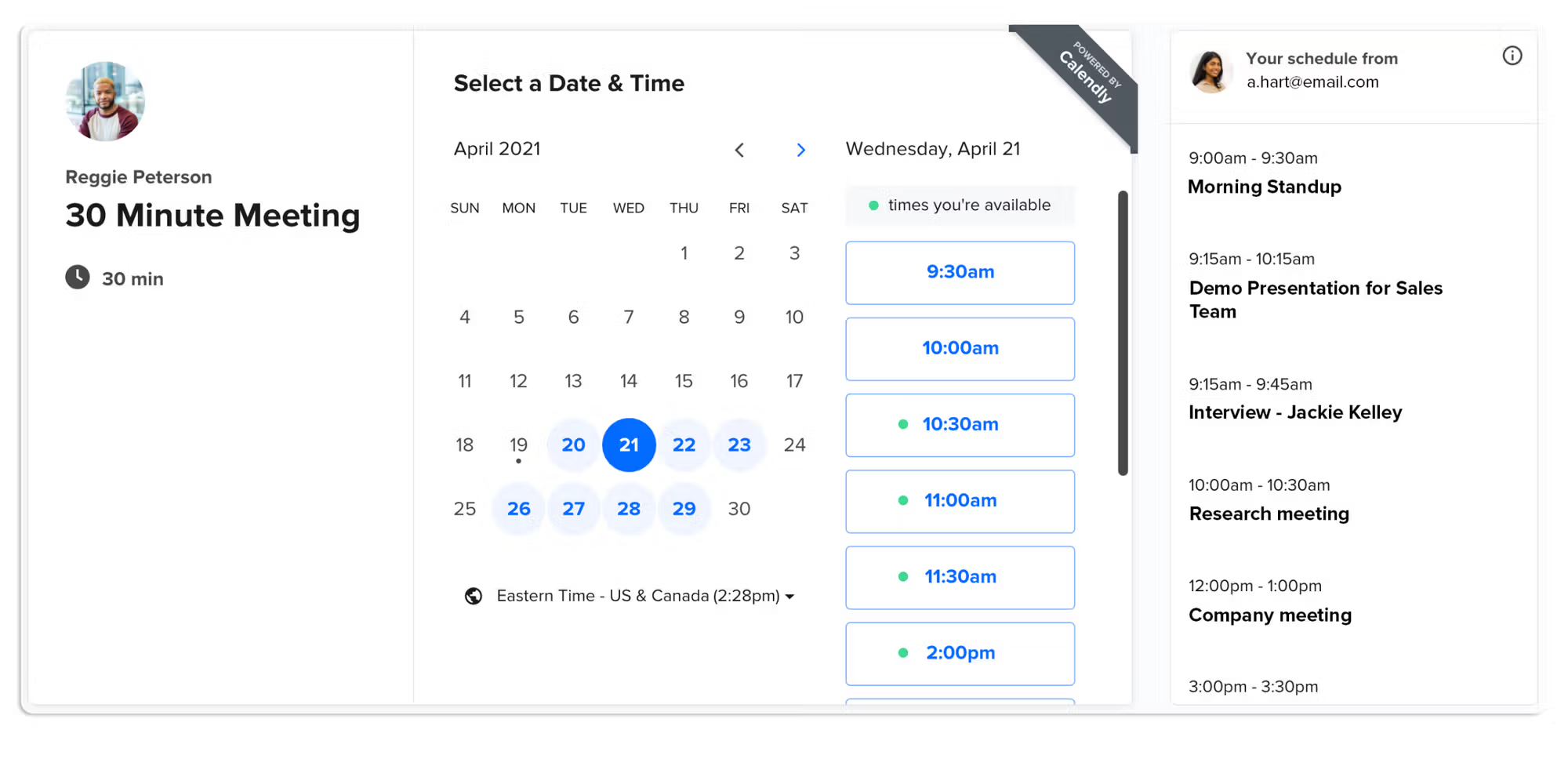
A Calendly booking page showing a 30 minute meeting with a date picker and available time slots
Calendly’s booking page — and, broadly, everyone’s. Nine of the ten tools here put a date picker on the left and a column of times on the right. That sameness is the point: the booking page is a solved problem, so it is not where the decision gets made.

Best for: Sales, recruiting, and revenue teams that distribute inbound meetings across multiple reps.

Where it falls short: Per-seat pricing adds up, the free plan is capped at one event type and one calendar connection, and round-robin only arrives on the $16/seat Teams tier. Calendly also stopped accepting new iCloud connections on 20 August 2024, so a new user cannot connect an Apple calendar at all. And a single booking link still does not unify or de-conflict the separate calendars a solo professional actually runs.

Pricing: Free (1 event type). Standard $10/seat/month ($8.30 annually), Teams $16 ($12.80), Enterprise from $15,000/year with a 50-seat minimum. Source: calendly.com/pricing

See the full BookTime vs Calendly breakdown →
Questions

Calendly alternatives, answered.

What is the best Calendly alternative? +

BookTime is the best Calendly alternative for professionals who run multiple calendars, because it unifies Google, Apple, and Outlook into one conflict-aware view and adds clean booking pages. Cal.com is the best open-source option, Acuity is best for service businesses that take payments, Morgen is the best calendar-and-tasks hybrid, and Calendly itself is still best for sales teams routing inbound leads.

Does Calendly work with Apple Calendar? +

Not for new users. Calendly stopped accepting new iCloud calendar connections on 20 August 2024; accounts that connected iCloud before that date still work. If you need Apple Calendar support today, BookTime, Cal.com, Acuity, YouCanBookMe, Morgen, and SavvyCal all connect to iCloud.

What is the best free Calendly alternative? +

Cal.com has the most generous free plan — one user with unlimited event types and unlimited connected calendars, plus a fully free self-hosted open-source version. Google Appointment Scheduling gives any Google account one booking page for free, YouCanBookMe’s free plan covers one calendar and one booking page, Square Appointments is free per location, and BookTime is free during its beta.

What is the best open-source Calendly alternative? +

Cal.com. It is self-hostable and API-first, which lets developers run scheduling on their own infrastructure with full data control or embed it directly into their own product. The open-source version can be self-hosted on your own infrastructure at no licence cost.

Is there a Calendly alternative that shows all my calendars in one view? +

Two tools on this list genuinely merge calendars rather than just connecting to them: BookTime and Morgen. BookTime is built around the unified view and costs $8/month flat; Morgen adds tasks and time-blocking on top and costs $15/month billed annually. Everything else — including Calendly — connects to several calendars to calculate availability but still shows you one calendar at a time.

Which Calendly alternative is cheapest? +

Free options first: Cal.com, Google Appointment Scheduling, Square Appointments, and YouCanBookMe all have real free tiers, and BookTime is free during beta. Among paid plans, YouCanBookMe Individual is $8.10/month billed annually and BookTime is $8/month flat — both cheaper than Calendly’s $8.30/seat annual Standard tier, and neither charges per seat the way Calendly does.

What is the best scheduling tool for Outlook and Google together? +

BookTime and Morgen both merge Outlook and Google — and Apple — into a single conflict-aware view. Cal.com, Acuity, YouCanBookMe, and SavvyCal all connect to both but keep them separate. Microsoft Bookings is Outlook-only and Google Appointment Scheduling is Google-only, so neither can see a conflict that lives in the other ecosystem.

Who should still use Calendly? +

Sales teams. Round-robin distribution, lead-routing forms, and native HubSpot and Salesforce integrations make Calendly strong when scheduling is a team conversion event rather than personal multi-calendar management. Note that round-robin sits on the Teams plan at $16/seat/month, or $12.80 billed annually.

Compare Calendly head-to-head

More hustle. Less hassle.

If you run your week across more than one calendar, BookTime is the alternative built for you. Unite every calendar, kill the double-bookings, and send booking pages clients love.

Continue with Google →

Free during beta · $8/mo when we launch · Cancel anytime